Category: Blog

  • android_kernel_lg_magna

            Linux kernel release 3.x <http://kernel.org/>
    
    These are the release notes for Linux version 3.  Read them carefully,
    as they tell you what this is all about, explain how to install the
    kernel, and what to do if something goes wrong. 
    
    WHAT IS LINUX?
    
      Linux is a clone of the operating system Unix, written from scratch by
      Linus Torvalds with assistance from a loosely-knit team of hackers across
      the Net. It aims towards POSIX and Single UNIX Specification compliance.
    
      It has all the features you would expect in a modern fully-fledged Unix,
      including true multitasking, virtual memory, shared libraries, demand
      loading, shared copy-on-write executables, proper memory management,
      and multistack networking including IPv4 and IPv6.
    
      It is distributed under the GNU General Public License - see the
      accompanying COPYING file for more details. 
    
    ON WHAT HARDWARE DOES IT RUN?
    
      Although originally developed first for 32-bit x86-based PCs (386 or higher),
      today Linux also runs on (at least) the Compaq Alpha AXP, Sun SPARC and
      UltraSPARC, Motorola 68000, PowerPC, PowerPC64, ARM, Hitachi SuperH, Cell,
      IBM S/390, MIPS, HP PA-RISC, Intel IA-64, DEC VAX, AMD x86-64, AXIS CRIS,
      Xtensa, Tilera TILE, AVR32 and Renesas M32R architectures.
    
      Linux is easily portable to most general-purpose 32- or 64-bit architectures
      as long as they have a paged memory management unit (PMMU) and a port of the
      GNU C compiler (gcc) (part of The GNU Compiler Collection, GCC). Linux has
      also been ported to a number of architectures without a PMMU, although
      functionality is then obviously somewhat limited.
      Linux has also been ported to itself. You can now run the kernel as a
      userspace application - this is called UserMode Linux (UML).
    
    DOCUMENTATION:
    
     - There is a lot of documentation available both in electronic form on
       the Internet and in books, both Linux-specific and pertaining to
       general UNIX questions.  I'd recommend looking into the documentation
       subdirectories on any Linux FTP site for the LDP (Linux Documentation
       Project) books.  This README is not meant to be documentation on the
       system: there are much better sources available.
    
     - There are various README files in the Documentation/ subdirectory:
       these typically contain kernel-specific installation notes for some 
       drivers for example. See Documentation/00-INDEX for a list of what
       is contained in each file.  Please read the Changes file, as it
       contains information about the problems, which may result by upgrading
       your kernel.
    
     - The Documentation/DocBook/ subdirectory contains several guides for
       kernel developers and users.  These guides can be rendered in a
       number of formats:  PostScript (.ps), PDF, HTML, & man-pages, among others.
       After installation, "make psdocs", "make pdfdocs", "make htmldocs",
       or "make mandocs" will render the documentation in the requested format.
    
    INSTALLING the kernel source:
    
     - If you install the full sources, put the kernel tarball in a
       directory where you have permissions (eg. your home directory) and
       unpack it:
    
         gzip -cd linux-3.X.tar.gz | tar xvf -
    
       or
    
         bzip2 -dc linux-3.X.tar.bz2 | tar xvf -
    
       Replace "X" with the version number of the latest kernel.
    
       Do NOT use the /usr/src/linux area! This area has a (usually
       incomplete) set of kernel headers that are used by the library header
       files.  They should match the library, and not get messed up by
       whatever the kernel-du-jour happens to be.
    
     - You can also upgrade between 3.x releases by patching.  Patches are
       distributed in the traditional gzip and the newer bzip2 format.  To
       install by patching, get all the newer patch files, enter the
       top level directory of the kernel source (linux-3.X) and execute:
    
         gzip -cd ../patch-3.x.gz | patch -p1
    
       or
    
         bzip2 -dc ../patch-3.x.bz2 | patch -p1
    
       Replace "x" for all versions bigger than the version "X" of your current
       source tree, _in_order_, and you should be ok.  You may want to remove
       the backup files (some-file-name~ or some-file-name.orig), and make sure
       that there are no failed patches (some-file-name# or some-file-name.rej).
       If there are, either you or I have made a mistake.
    
       Unlike patches for the 3.x kernels, patches for the 3.x.y kernels
       (also known as the -stable kernels) are not incremental but instead apply
       directly to the base 3.x kernel.  For example, if your base kernel is 3.0
       and you want to apply the 3.0.3 patch, you must not first apply the 3.0.1
       and 3.0.2 patches. Similarly, if you are running kernel version 3.0.2 and
       want to jump to 3.0.3, you must first reverse the 3.0.2 patch (that is,
       patch -R) _before_ applying the 3.0.3 patch. You can read more on this in
       Documentation/applying-patches.txt
    
       Alternatively, the script patch-kernel can be used to automate this
       process.  It determines the current kernel version and applies any
       patches found.
    
         linux/scripts/patch-kernel linux
    
       The first argument in the command above is the location of the
       kernel source.  Patches are applied from the current directory, but
       an alternative directory can be specified as the second argument.
    
     - Make sure you have no stale .o files and dependencies lying around:
    
         cd linux
         make mrproper
    
       You should now have the sources correctly installed.
    
    SOFTWARE REQUIREMENTS
    
       Compiling and running the 3.x kernels requires up-to-date
       versions of various software packages.  Consult
       Documentation/Changes for the minimum version numbers required
       and how to get updates for these packages.  Beware that using
       excessively old versions of these packages can cause indirect
       errors that are very difficult to track down, so don't assume that
       you can just update packages when obvious problems arise during
       build or operation.
    
    BUILD directory for the kernel:
    
       When compiling the kernel, all output files will per default be
       stored together with the kernel source code.
       Using the option "make O=output/dir" allow you to specify an alternate
       place for the output files (including .config).
       Example:
    
         kernel source code: /usr/src/linux-3.X
         build directory:    /home/name/build/kernel
    
       To configure and build the kernel, use:
    
         cd /usr/src/linux-3.X
         make O=/home/name/build/kernel menuconfig
         make O=/home/name/build/kernel
         sudo make O=/home/name/build/kernel modules_install install
    
       Please note: If the 'O=output/dir' option is used, then it must be
       used for all invocations of make.
    
    CONFIGURING the kernel:
    
       Do not skip this step even if you are only upgrading one minor
       version.  New configuration options are added in each release, and
       odd problems will turn up if the configuration files are not set up
       as expected.  If you want to carry your existing configuration to a
       new version with minimal work, use "make oldconfig", which will
       only ask you for the answers to new questions.
    
     - Alternative configuration commands are:
    
         "make config"      Plain text interface.
    
         "make menuconfig"  Text based color menus, radiolists & dialogs.
    
         "make nconfig"     Enhanced text based color menus.
    
         "make xconfig"     X windows (Qt) based configuration tool.
    
         "make gconfig"     X windows (Gtk) based configuration tool.
    
         "make oldconfig"   Default all questions based on the contents of
                            your existing ./.config file and asking about
                            new config symbols.
    
         "make silentoldconfig"
                            Like above, but avoids cluttering the screen
                            with questions already answered.
                            Additionally updates the dependencies.
    
         "make olddefconfig"
                            Like above, but sets new symbols to their default
                            values without prompting.
    
         "make defconfig"   Create a ./.config file by using the default
                            symbol values from either arch/$ARCH/defconfig
                            or arch/$ARCH/configs/${PLATFORM}_defconfig,
                            depending on the architecture.
    
         "make ${PLATFORM}_defconfig"
                            Create a ./.config file by using the default
                            symbol values from
                            arch/$ARCH/configs/${PLATFORM}_defconfig.
                            Use "make help" to get a list of all available
                            platforms of your architecture.
    
         "make allyesconfig"
                            Create a ./.config file by setting symbol
                            values to 'y' as much as possible.
    
         "make allmodconfig"
                            Create a ./.config file by setting symbol
                            values to 'm' as much as possible.
    
         "make allnoconfig" Create a ./.config file by setting symbol
                            values to 'n' as much as possible.
    
         "make randconfig"  Create a ./.config file by setting symbol
                            values to random values.
    
         "make localmodconfig" Create a config based on current config and
                               loaded modules (lsmod). Disables any module
                               option that is not needed for the loaded modules.
    
                               To create a localmodconfig for another machine,
                               store the lsmod of that machine into a file
                               and pass it in as a LSMOD parameter.
    
                       target$ lsmod > /tmp/mylsmod
                       target$ scp /tmp/mylsmod host:/tmp
    
                       host$ make LSMOD=/tmp/mylsmod localmodconfig
    
                               The above also works when cross compiling.
    
         "make localyesconfig" Similar to localmodconfig, except it will convert
                               all module options to built in (=y) options.
    
       You can find more information on using the Linux kernel config tools
       in Documentation/kbuild/kconfig.txt.
    
     - NOTES on "make config":
    
        - Having unnecessary drivers will make the kernel bigger, and can
          under some circumstances lead to problems: probing for a
          nonexistent controller card may confuse your other controllers
    
        - Compiling the kernel with "Processor type" set higher than 386
          will result in a kernel that does NOT work on a 386.  The
          kernel will detect this on bootup, and give up.
    
        - A kernel with math-emulation compiled in will still use the
          coprocessor if one is present: the math emulation will just
          never get used in that case.  The kernel will be slightly larger,
          but will work on different machines regardless of whether they
          have a math coprocessor or not.
    
        - The "kernel hacking" configuration details usually result in a
          bigger or slower kernel (or both), and can even make the kernel
          less stable by configuring some routines to actively try to
          break bad code to find kernel problems (kmalloc()).  Thus you
          should probably answer 'n' to the questions for "development",
          "experimental", or "debugging" features.
    
    COMPILING the kernel:
    
     - Make sure you have at least gcc 3.2 available.
       For more information, refer to Documentation/Changes.
    
       Please note that you can still run a.out user programs with this kernel.
    
     - Do a "make" to create a compressed kernel image. It is also
       possible to do "make install" if you have lilo installed to suit the
       kernel makefiles, but you may want to check your particular lilo setup first.
    
       To do the actual install, you have to be root, but none of the normal
       build should require that. Don't take the name of root in vain.
    
     - If you configured any of the parts of the kernel as `modules', you
       will also have to do "make modules_install".
    
     - Verbose kernel compile/build output:
    
       Normally, the kernel build system runs in a fairly quiet mode (but not
       totally silent).  However, sometimes you or other kernel developers need
       to see compile, link, or other commands exactly as they are executed.
       For this, use "verbose" build mode.  This is done by inserting
       "V=1" in the "make" command.  E.g.:
    
         make V=1 all
    
       To have the build system also tell the reason for the rebuild of each
       target, use "V=2".  The default is "V=0".
    
     - Keep a backup kernel handy in case something goes wrong.  This is 
       especially true for the development releases, since each new release
       contains new code which has not been debugged.  Make sure you keep a
       backup of the modules corresponding to that kernel, as well.  If you
       are installing a new kernel with the same version number as your
       working kernel, make a backup of your modules directory before you
       do a "make modules_install".
    
       Alternatively, before compiling, use the kernel config option
       "LOCALVERSION" to append a unique suffix to the regular kernel version.
       LOCALVERSION can be set in the "General Setup" menu.
    
     - In order to boot your new kernel, you'll need to copy the kernel
       image (e.g. .../linux/arch/i386/boot/bzImage after compilation)
       to the place where your regular bootable kernel is found. 
    
     - Booting a kernel directly from a floppy without the assistance of a
       bootloader such as LILO, is no longer supported.
    
       If you boot Linux from the hard drive, chances are you use LILO, which
       uses the kernel image as specified in the file /etc/lilo.conf.  The
       kernel image file is usually /vmlinuz, /boot/vmlinuz, /bzImage or
       /boot/bzImage.  To use the new kernel, save a copy of the old image
       and copy the new image over the old one.  Then, you MUST RERUN LILO
       to update the loading map!! If you don't, you won't be able to boot
       the new kernel image.
    
       Reinstalling LILO is usually a matter of running /sbin/lilo. 
       You may wish to edit /etc/lilo.conf to specify an entry for your
       old kernel image (say, /vmlinux.old) in case the new one does not
       work.  See the LILO docs for more information. 
    
       After reinstalling LILO, you should be all set.  Shutdown the system,
       reboot, and enjoy!
    
       If you ever need to change the default root device, video mode,
       ramdisk size, etc.  in the kernel image, use the 'rdev' program (or
       alternatively the LILO boot options when appropriate).  No need to
       recompile the kernel to change these parameters. 
    
     - Reboot with the new kernel and enjoy. 
    
    IF SOMETHING GOES WRONG:
    
     - If you have problems that seem to be due to kernel bugs, please check
       the file MAINTAINERS to see if there is a particular person associated
       with the part of the kernel that you are having trouble with. If there
       isn't anyone listed there, then the second best thing is to mail
       them to me (torvalds@linux-foundation.org), and possibly to any other
       relevant mailing-list or to the newsgroup.
    
     - In all bug-reports, *please* tell what kernel you are talking about,
       how to duplicate the problem, and what your setup is (use your common
       sense).  If the problem is new, tell me so, and if the problem is
       old, please try to tell me when you first noticed it.
    
     - If the bug results in a message like
    
         unable to handle kernel paging request at address C0000010
         Oops: 0002
         EIP:   0010:XXXXXXXX
         eax: xxxxxxxx   ebx: xxxxxxxx   ecx: xxxxxxxx   edx: xxxxxxxx
         esi: xxxxxxxx   edi: xxxxxxxx   ebp: xxxxxxxx
         ds: xxxx  es: xxxx  fs: xxxx  gs: xxxx
         Pid: xx, process nr: xx
         xx xx xx xx xx xx xx xx xx xx
    
       or similar kernel debugging information on your screen or in your
       system log, please duplicate it *exactly*.  The dump may look
       incomprehensible to you, but it does contain information that may
       help debugging the problem.  The text above the dump is also
       important: it tells something about why the kernel dumped code (in
       the above example, it's due to a bad kernel pointer). More information
       on making sense of the dump is in Documentation/oops-tracing.txt
    
     - If you compiled the kernel with CONFIG_KALLSYMS you can send the dump
       as is, otherwise you will have to use the "ksymoops" program to make
       sense of the dump (but compiling with CONFIG_KALLSYMS is usually preferred).
       This utility can be downloaded from
       ftp://ftp.<country>.kernel.org/pub/linux/utils/kernel/ksymoops/ .
       Alternatively, you can do the dump lookup by hand:
    
     - In debugging dumps like the above, it helps enormously if you can
       look up what the EIP value means.  The hex value as such doesn't help
       me or anybody else very much: it will depend on your particular
       kernel setup.  What you should do is take the hex value from the EIP
       line (ignore the "0010:"), and look it up in the kernel namelist to
       see which kernel function contains the offending address.
    
       To find out the kernel function name, you'll need to find the system
       binary associated with the kernel that exhibited the symptom.  This is
       the file 'linux/vmlinux'.  To extract the namelist and match it against
       the EIP from the kernel crash, do:
    
         nm vmlinux | sort | less
    
       This will give you a list of kernel addresses sorted in ascending
       order, from which it is simple to find the function that contains the
       offending address.  Note that the address given by the kernel
       debugging messages will not necessarily match exactly with the
       function addresses (in fact, that is very unlikely), so you can't
       just 'grep' the list: the list will, however, give you the starting
       point of each kernel function, so by looking for the function that
       has a starting address lower than the one you are searching for but
       is followed by a function with a higher address you will find the one
       you want.  In fact, it may be a good idea to include a bit of
       "context" in your problem report, giving a few lines around the
       interesting one. 
    
       If you for some reason cannot do the above (you have a pre-compiled
       kernel image or similar), telling me as much about your setup as
       possible will help.  Please read the REPORTING-BUGS document for details.
    
     - Alternatively, you can use gdb on a running kernel. (read-only; i.e. you
       cannot change values or set break points.) To do this, first compile the
       kernel with -g; edit arch/i386/Makefile appropriately, then do a "make
       clean". You'll also need to enable CONFIG_PROC_FS (via "make config").
    
       After you've rebooted with the new kernel, do "gdb vmlinux /proc/kcore".
       You can now use all the usual gdb commands. The command to look up the
       point where your system crashed is "l *0xXXXXXXXX". (Replace the XXXes
       with the EIP value.)
    
       gdb'ing a non-running kernel currently fails because gdb (wrongly)
       disregards the starting offset for which the kernel is compiled.


    Visit original content creator repository

  • PygameDeepRLAgent

    I’ve been updating this readme as i experiment and make changes to the code, which could include changes to the actual neural network. This means that trying to reproduce these results now by using the parameters i used might not give the same results, because the network is likely different now from when i ran the training session that produced the result given in the readme. Looking at the version control history of this readme, and checking out the commit that the result was added in should work.

    PygameDeepRLAgent

    This project is about training deepRL agents at varius tasks made with pygame. Currently using an A3C agent.
    Results

    FeedingGrounds

    alt text

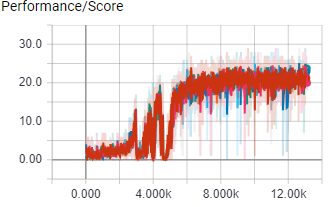
    The above image shows score per episode for 8 workers during their 1 day and 20 hour training session in the A3Cbootcamp game level FeedingGrounds, a game where the agent has to “eat food” by moving to the green squares, the agent controls a blue square inside a square environment.

    The agent was trained using a i7 6700k and a GTX 1080 ti

    a3c_0 97_plus_18900

    The above gif shows a sequence of the game, the way the agent sees it.
    ShootingGrounds

    a3cshootinggroundslr a3cshootinggroundsscore

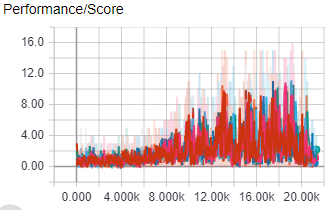
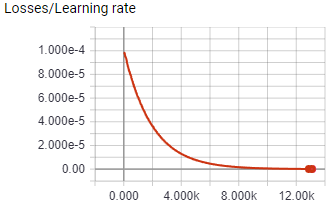
    The above images shows the score and learning rate per episode of 8 A3C worker agents during their almost 18 hour training session in the ShootingGrounds level of A3CBootcamp. The agents control a blue square with the ability to shoot, and it has to shoot the read squares. Shooting a red square rewards the agent with 1 point. The agent needs to shoot as many red squares as possible within the time limit to get the most points.

    Youtube video of agent progress in ShootingGrounds: https://www.youtube.com/watch?v=fEKITU7cjNg&feature=youtu.be

    Causality tracking

    Causality tracking is a system in this project that tries to solve the credit assignment problem. Causality tracking assigns rewards to the (action, state) tuple that caused the reward. In practice this means that the game keeps track of at which time step all bullets are fired, and when a bullet hits something, the reward is credited to the (action, state) tuple from which the bullet was fired instead of the most current (action, state) tuple.

    Test

    This causality tracking test was done in the ShootingGrounds game.
    shootinggroundscttestlr

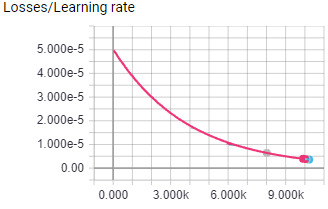
    The above image shows the learning rate for both test. Both test were run for 10K episodes with 16 worker agents, all hyper parameters were the same.
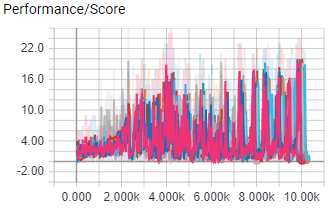
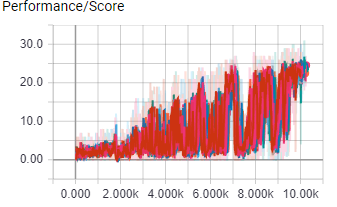
    Causality tracking disabled

    shootinggroundsctfalsescore

    Causality tracking enabled

    shootinggroundscttruescore

    Result

    With causality tracking disabled, the agent performance peaked at 20 points, with causality tracking enabled performance peaked at 25 points.

    This means that for this experiment causality tracking improved perfomance by 25%

    Visit original content creator repository
  • clean-code-study-project

    clean-code-study-project

    Projeto com o intuito de estudo para praticar os exercícios / exemplos sugeridos no livro Clean Code (Código Limpo) e fazer anotações.

    Capítulo 1 – Código Limpo

    Capítulo 2 – Nomes Significativos

    Use nomes que revelem seu propósito

    O nome de uma váriavel deve dizer seu propósito (porque ela existe)

    Se requer um comentário, então o nome não revela seu propósito

    Para entender o código do exercício 2 tenho que saber:

    • O que está na theList – tabuleiro do campo minado
    • Para que serve a posição 0 da lista – valor do status de uma célula no tabuleiro
    • O que significa o valor 4 – diz se a célula está marcada com uma bandeirinha
    • Para que eu usaria a lista retornada – obter a lista de células que estão marcadas com a bandeirinha, para verificar se o jogador já marcou todas as bombas e ganhou, por exemplo

    Contexto implícito dificulta o entendimento do código

    Evite informações erradas

    Faça distinções significativas

    Nomes sequencias (a1 .. aN) não dizem nada.

    Adicionar o tipo da variável no nome é redundante, exemplo: nome e nomeString, Customer e CustomerObject.

    Palavras comuns confundem, qual a diferença de: moneyAmount de money, customerInfo de customer, accountData de account.

    A informação complementar agrega significado? Diferencia algo realmente?

    Use nomes pronunciáveis

    Nomes pronunciáveis são importantes para facilitar a comunicação.

    Se pessoas novas precisam pedir para explicar o significado dos nomes é um forte indício que são nomes de baixa qualidade, seria mais simples e barato usar palavras que já existem na língua

    Use nomes passíveis de busca

    Escrever nomes pensando em como o buscaria

    Evite codificações

    “Codificar informações do escopo ou tipos em nomes simplesmente adiciona uma tarefa extra de decodificação… É uma sobrecarga mental desnecessária ao tentar resolver um problema.”

    Evite o mapeamento mental

    Evitar que as pessoas tenham que fazer traduções mentais de nomes escolhidos para os conhecidos.

    Usar termo de domínio do problema e da solução.

    Clareza é fundamental. Os profissionais usam seus poderes para o bem e escrevem códigos que outros possam entender.”

    Nomes de classes

    Classes e objetos devem ter nomes com substantivo(s), evitar palavras que podem ser tanto substantivo quanto verbo, exemplo: Manager.

    Nomes de métodos

    Devem ser verbos.

    Padrão javabean get, set e is + valor

    Usar factory methods estáticos com nomes que descrevem os pârametros quando os construtores da classe estiverem sobrecarregados. Para forçar o uso da factory deixar os contrutores correspondentes como privados.

    Complex fulcrumPoint = Complex.FromRealNumber(23.0); 
    
    // Melhor que:
    
    Complex fulcrumPoint = new Complex(23.0);


    Visit original content creator repository

  • polkahistory

    Polkahistory

    This website helps people find their account balance at any date and time. The user simply enters the address and date he wants to search for, the website will then perform a binary search through the blockchain looking for the block with the timestamp closest to the target date and time. It currently only works for the Polkadot network, however there are plans to expand the website to other networks like Kusama.

    📏 Techs used in the project

    The website was built using React.js with Chakra UI, Polkadot API and react-datepicker. Chakra UI and React were chosen because of my familiarity with such tools, which enabled me to build the initial version of the site in a few hours.

    How it works

    When I got the idea to do this project, the first Google search I did was “how to find Polkadot blocks by date”. The research ended up showing me that this was not possible in an easy way and hardly something like this would be implemented since there were block indexers that already provided this feature.

    The indexers I found did not serve me the way I would like and I came up with the idea of fetching the block manually. Assuming that we can see the timestamp of all blocks in the chain, I decided to implement a binary search to find the block closest to a timestamp. The use of binary search slightly impairs the speed of response for searches, since it will have to consult timestamps of several blocks until it finds the target block. However, it is a simple and straightforward solution.

    Roadmap

    The website is still extremely simple, there are many improvements to be made, such as: error validation, UX improvements, possibility of consultation on other networks and so on. Such features will be implemented soon.

    Buy me a coffee

    If you found the project interesting or were helped by the website, you can buy me a coffee. Just send me your tip in DOT to the following address: 12ENWcCZ6PsMPMULpYNhoevt2cVQypcR7sBEujzQJovJVdg8

    Visit original content creator repository

  • microsphere-java

    Microsphere Java Framework

    Welcome to the Microsphere Java Framework

    Ask DeepWiki zread Maven Build Codecov Maven License Average time to resolve an issue Percentage of issues still open

    Introduction

    Microsphere Java Framework is a foundational library that serves as the backbone for MicroSphere ecosystem. It provides a rich set of reusable components, utilities, and annotation processing capabilities that address common challenges in Java development. Whether you’re building enterprise applications, microservices, or standalone Java tools, this framework offers the building blocks you need to accelerate development and maintain consistency across your projects.

    The framework is designed with modularity at its core, allowing you to use only the components you need while keeping your application lightweight and efficient. It’s built on standard Java APIs and integrates seamlessly with popular frameworks like Spring, making it a versatile addition to any Java developer’s toolkit.

    Features

    • Core Utilities
    • I/O
    • Collection manipulation
    • Class loading
    • Concurrency
    • Reflection
    • Networking
    • Artifact management
    • Event Sourcing
    • JMX
    • Versioning
    • Annotation processing

    Modules

    The framework is organized into several key modules:

    Module Purpose
    microsphere-java-core Provides core utilities across various domains like annotations, collections, concurrency, etc.
    microsphere-annotation-processor Offers annotation processing capabilities for compile-time code generation
    microsphere-java-dependencies Manages dependency versions across the project
    microsphere-java-parent Parent POM with shared configurations

    Getting Started

    The easiest way to get started is by adding the Microsphere Java BOM (Bill of Materials) to your project’s pom.xml:

    dependencyManagement> <dependencies> ... <!-- Microsphere Dependencies --> <dependency> <groupId>io.github.microsphere-projects</groupId> <artifactId>microsphere-java-dependencies</artifactId> <version>${microsphere-java.version}</version> <type>pom</type> <scope>import</scope> </dependency> ... </dependencies> </dependencyManagement>

    Then add the specific modules you need:

    dependencies> <!-- Core utilities --> <dependency> <groupId>io.github.microsphere-projects</groupId> <artifactId>microsphere-java-core</artifactId> </dependency> <!-- Annotation processing (optional) --> <dependency> <groupId>io.github.microsphere-projects</groupId> <artifactId>microsphere-annotation-processor</artifactId> </dependency> </dependencies>

    Quick Examples

    import io.microsphere.util.StringUtils;
    import org.junit.jupiter.api.Test;
    
    import static org.junit.jupiter.api.Assertions.*;
    
    public class MicrosphereTest {
    
        @Test
        public void testStringUtils() {
            assertTrue(StringUtils.isBlank(null));
            assertTrue(StringUtils.isBlank(""));
            assertFalse(StringUtils.isBlank("Hello"));
        }
    }

    Building from Source

    You don’t need to build from source unless you want to try out the latest code or contribute to the project.

    To build the project, follow these steps:

    1. Clone the repository:
    git clone https://github.com/microsphere-projects/microsphere-java.git
    1. Build the source:
    • Linux/MacOS:
    ./mvnw package
    • Windows:
    mvnw.cmd package

    Contributing

    We welcome your contributions! Please read Code of Conduct before submitting a pull request.

    Reporting Issues

    • Before you log a bug, please search the issues to see if someone has already reported the problem.
    • If the issue doesn’t already exist, create a new issue.
    • Please provide as much information as possible with the issue report.

    Documentation

    User Guide

    DeepWiki Host

    ZRead Host

    Wiki

    Github Host

    JavaDoc

    License

    The Microsphere Java is released under the Apache License 2.0.

    Visit original content creator repository
  • math-percentage

    Percentage

    Codacy grade Codacy coverage

    Percentage calculations made easy.

    Installation

    Add Percentage to your Gradle build script:

    repositories {
        mavenCentral()
    }
    
    dependencies {
        implementation("com.eriksencosta.math:percentage:0.3.0")
    }

    If you’re using Maven, add to your POM xml file:

    <dependency>
        <groupId>com.eriksencosta.math</groupId>
        <artifactId>percentage</artifactId>
        <version>0.3.0</version>
    </dependency>

    Usage

    The library provides the Percentage type: an immutable and thread-safe class that makes percentage calculations easy.

    150 * 5.5.percent()          // 8.25
    150 decreaseBy 5.5.percent() // 141.75
    150 increaseBy 5.5.percent() // 158.25

    Under the hood, all calculations are done by the immutable and thread-safe Percentage class. You can always query for the percentage’s original value, and its decimal representation (i.e., its value divided by 100):

    val percentage = 5.5.percent()
    percentage.decimal // 0.055
    percentage.value   // 5.5

    Rounding

    If you need to round the resulting calculations using a Percentage, just pass an instance of the Rounding class to the percent() method. Use the Rounding.to() factory method to create the object, passing the number of decimal places and the desired rounding mode:

    val percentage = 11.603773.percent()
    val roundsFloor = 11.603773.percent(Rounding.to(2, RoundingMode.FLOOR))
    
    val value = 127
    value * percentage  // 14.73679171
    value * roundsFloor // 14.73

    The rounding mode to use is defined by one of RoundingMode enum values. If you need to use HALF_EVEN, just pass the number of desired decimal places:

    val roundsHalfUp = 11.603773.percent(2)
    value * roundsHalfUp // 14.74

    Other utilities

    Create a Percentage based on a ratio

    To create a Percentage based on a ratio (e.g. 1/2, 1/3, 1/4, and so on), use the ratioOf() function:

    1 ratioOf 4 // 25%
    1 ratioOf 3 // 33.33%

    The function also has overloaded versions to control the rounding strategy of the returned Percentage object:

    // rounds using 2 decimal places and with RoundingMode.HALF_EVEN
    1.ratioOf(3, 2)
    
    // rounds using 2 decimal places and with RoundingMode.UP
    1.ratioOf(3, Rounding.to(2, RoundingMode.UP))

    Calculate the relative change as a Percentage for two numbers

    To calculate the relative change between two numbers, use the relativeChange() function:

    1 relativeChange 3 // 200%
    3 relativeChange 1 // -66.67%

    The function also has overloaded versions to control the rounding strategy of the returned Percentage object:

    // rounds using 2 decimal places and with RoundingMode.HALF_EVEN
    3.relativeChange(1, 2)
    
    // rounds using 2 decimal places and with RoundingMode.UP
    3.relativeChange(1, Rounding.to(2, RoundingMode.UP))

    Calculate the base value of a number when it’s a given Percentage

    To calculate the base value of a number when it’s a given Percentage, use the valueWhen() function:

    5 valueWhen 20.percent() // 25.0

    In other words, the function helps to answer the question “5 is 20% of what number?”

    Code examples

    The UsageExamples file has more examples of calculations using the Percentage library.

    API documentation

    Read the API documentation for further details.

    License

    The Apache Software License, Version 2.0

    Visit original content creator repository
  • BoardTemplate

    Board Template Project

    Node.js를 기반으로 제작한 게시판 템플릿으로, 기본적인 웹 사이트 디자인과 게시판 기능들을 제작해둔 프로젝트 입니다. 공부 및 타 프로젝트에 쉽게 적용하기 위해 제작하게 되었으며 버그 및 개선에 대해서 다양한 피드백 부탁드립니다.

    Database Setting

    Create Database

    > use btDB

    Auto Increment function

    > function autoInc(id) {
    	var ret = db.incCol.findAndModify({
    		query:{_id:id},
    		update: {$inc: {incNum:1}},
    		"new":true,
    		upsert:true
    	});
    	return ret.incNum;
    }

    임시 데이터를 생성하기 이전에 MongoDB에서의 auto increment를 위해 위 함수를 선언해 주시길 바랍니다. auto increment가 작동하는 방식이라면, 꼭 위의 함수를 사용하지 않아도 됩니다.

    Insert BBS Temp Data

    > db.bbs.insertMany([
        {idx:autoInc("bbs"), title:"This is temp Title _ 0", author:"kyechan", date:new Date()},
        {idx:autoInc("bbs"), title:"This is temp Title _ 1", author:"John", date:new Date()},
        {idx:autoInc("bbs"), title:"This is temp Title _ 2", author:"Andrew", date:new Date()},
        {idx:autoInc("bbs"), title:"This is temp Title _ 3", author:"Henry", date:new Date()},
        {idx:autoInc("bbs"), title:"This is temp Title _ 4", author:"Park", date:new Date()},
        {idx:autoInc("bbs"), title:"This is temp Title _ 5", author:"Kim K", date:new Date()},
        {idx:autoInc("bbs"), title:"This is temp Title _ 6", author:"Park", date:new Date()},
        {idx:autoInc("bbs"), title:"This is temp Title _ 7", author:"Yahn", date:new Date()},
        {idx:autoInc("bbs"), title:"This is temp Title _ 8", author:"kyechan", date:new Date()},
        {idx:autoInc("bbs"), title:"This is temp Title _ 9", author:"Kang", date:new Date()},
        {idx:autoInc("bbs"), title:"This is temp Title _ 10", author:"Henry", date:new Date()},
        {idx:autoInc("bbs"), title:"This is temp Title _ 11", author:"Andrew", date:new Date()}
    ])

    임시 데이터들입니다. If you need more temp data -> moreTempData

    Insert User Temp Data

    > db.users.insertMany([
        {idx:autoInc("users"), id:"test", pw:"test"},
        {idx:autoInc("users"), id:"root", pw:"1234"},
        {idx:autoInc("users"), id:"kyechan", pw:"1234"},
        {idx:autoInc("users"), id:"John", pw:"1234"}
    ])

    Preview

    Visit original content creator repository
  • reflow

    Reflow 🚀

    An opinionated workflow tool for Typescript projects 🚀

    Reflow is aimed at reducing the complexity in setting up a proper dev environment for typescript projects.

    Features

    Installation

    Install locally:

    npm install @eriicafes/reflow

    And initialise:

    npx reflow init

    Or install both globally and locally (preferred):

    npm install -g @eriicafes/reflow # global
    
    npm install @eriicafes/reflow #local

    And initialise:

    reflow init

    With a global installation you will not be required to use npx. Global installation is preferred as reflow still requires a local installation and will always run the locally installed binary when available.

    Usage/Examples

    Examples below assume you have both a global installation and a local installation, for local installation only you will have to prefix the command with npx

    All commands have a -h or --help flag to display a help message.
    Nearly all commands have a -d or --dry-run flag useful to see the commands that would run without actually making any changes.
    Command arguments in square brackets [] are optional while those in angle brackets <> are required.

    Initialise reflow workspace

    reflow init
    
    Options:
      -n --no-install  turn off automatic package installation
      --lib            initialize as an npm library

    Branching

    create and checkout new branch

    reflow branch [name] [parent]

    rename the current branch

    reflow branch -r [name]

    Checkout

    reflow checkout [branch]

    checkout with search on branches (this examples searches for all branches beginning with feat)

    reflow checkout feat

    Merge

    merge branch to the main branch (whether on the main branch or on the branch to be merged)

    reflow merge
    
    Options:
      --prefer-ff   always perform a fast-foward merge (default: false)

    Commit

    reflow commit
    
    Options:
      --retry     retry last commit attempt

    Push

    push branch to remote (prompts to sets upstream if not available)
    force push is a bit less dangerous as the following flags are attached -f --force-with-lease --force-if-includes

    reflow push
    
    Options:
      -f --force  force push

    Release

    make a release (bump version, tag commit and push changes)
    would usually only be run on a CI/CD pipeline except if -f or --force flag is used

    reflow release
    
    Options:
      -f --force      force release when not in a CI environment (default: false)
      -a --as <type>  release with a specific version type
      --no-push       prevent pushing changes and tags to remote

    NOTE: For projects that started with a major version at zero (0.y.z) you may need some manual action to bump the major version to 1.0.0. Once the project is ready for the first major release, run the command below from the main branch:

    reflow release --as major -f

    Prerelease

    make a pre-release (eg. v1.0.1-{tag}.0)

    reflow prerelease
    
    Options:
      -t --tag <name>  pre-release tag
      --as <type>      release with a specific version type
      --no-push        prevent pushing changes and tags to remote

    for example if version is at 0.1.0 and we want to make a prerelease with an alpha tag and release as a a minor version:

    reflow prerelease -t alpha --as minor

    this will bump the version from 0.1.0 to 0.2.0-alpha.0

    Generate Files

    type includes configs, actions and hooks, file is the file name, run the command without any arguments to see all possible files to generate

    reflow generate [type] [file]
    
    Options:
       -c --common   generate all common template files
       -a --all      generate all template files

    Actions (github actions)

    When you run reflow init a test.yml workflow will be generated, which will run tests and build using npm test and npm run build respectively.
    All actions are listed below:

    • test.yml (run tests and build)
    • version.yml (bump version and push new update with tags) requires a VERSION_TOKEN secret containing a Github Personal Access Token with repo permissions
    • release.yml (triggered by version.yml workflow, creates a draft github release)
    • publish.yml (triggered by release.yml workflow, publishes package to NPM) requires an NPM_TOKEN secret containing an NPM Access Token

    All actions can be modified as needed

    Advanced (configure reflow CLI)

    For some use cases you may need to override certain defaults in the reflow config by first generating the config file using reflow generate and selecting config/reflow (which is probably the last item on the list)

    Below are the defaults which you may customize as needed:

    {
      "mainBranch": "main",
      "remote": "origin",
      "branchDelimeter": "/",
      "allowedBranches": [
        "feature",
        "fix",
        "chore",
        "refactor",
        "build",
        "style",
        "docs",
        "test"
      ],
      "keepMergeCommits": true
    }

    Contributing

    Pull requests are always welcome!

    Authors

    Visit original content creator repository

  • nft-marketplace-vyper

    NFT Marketplace contract (VYPER)

    This is the VYPER version of the repository, you also can find a SOLIDITY version

    This is a repository to work with and create a NFT Marketplace in a javascript environment using hardhat.
    This is a backend repository, it also work with a frontend repository. However you absolutly can use this repository without the frontend part.

    Summary

    NFT Marketplace

    The NFT Marketplace contract creates a NFT marketplace where any NFT collection can be listed or bought
    Every user can withdraw the ETH from the NFT they sold.

    The NFT Marketplace allow you to :

    • listNft: List a NFT on the marketplace with a given ETH price from any collection.
    • buyNft: Buy a NFT on the marketplace from any collection.
    • updateNftListing: Update the ETH price of your listed NFTs.
    • cancelNftListing: Cancel the listing of your NFT.
    • withdrawProceeds: Withdraw the ETH from the NFTs you sold on the Marketplace.

    NFT Collections

    This repository comes with 2 NFTs contract, each creating a NFT collection.
    The constructor takes a mint fee in ETH and an array of token uris for each characters of the collection.

    This contract implements :

    • Chainlink VRF to pick a random NFT when the user mint.

    The NFT Collections allows you to :

    Prerequisites

    Please install or have installed the following:

    Installation

    1. Clone this repository

    git clone https://github.com/jrmunchkin/nft-marketplace
    cd nft-marketplace
    
    1. Install dependencies
    yarn
    

    Testnet Development

    If you want to be able to deploy to testnets, do the following. I suggest to use goerli network.

    cp .env.example .env

    Set your GOERLI_RPC_URL, and PRIVATE_KEY

    You can get a GOERLI_RPC_URL by opening an account at Alchemy. Follow the steps to create a new application.

    You also can work with Infura.

    You can find your PRIVATE_KEY from your ethereum wallet like metamask.

    To be able to fully use the NFT collections you will need an account on Pinata. It will help you to push your NFTs metadata on IPFS and create a pin for you. To use Pinata you will need an PINATA_API_KEY, a PINATA_API_SECRET and a PINATA_JWT that you can find in the developers section. Additionally use UPLOAD_TO_PINATA to push conditionally on pinata.

    If you want to use it with the frontend repository, You also can clone it and set your frontend path FRONT_END_FOLDER

    the UPDATE_FRONT_END set to true will update your frontend with the last deployed contract.

    Finally you can add a COINMARKETCAP_API_KEY if you want to use hardhat gas reporter. You can find one by registring to CoinMarketCap Developers.

    You can add your environment variables to the .env file:

    PRIVATE_KEY=<PRIVATE_KEY>
    GOERLI_RPC_URL=<RPC_URL>
    COINMARKETCAP_API_KEY=<YOUR_API_KEY>
    FRONT_END_FOLDER=<YOUR_PATH_TO_FRONTEND>
    UPDATE_FRONT_END=<TRUE_OR_FALSE>
    PINATA_API_KEY=<YOUR_API_KEY>
    PINATA_API_SECRET=<YOUR_API_SECRET>
    PINATA_JWT=<YOUR_JWT>
    UPLOAD_TO_PINATA=<TRUE_OR_FALSE>

    You’ll also need testnet goerli ETH if you want to deploy on goerli tesnet. You can get ETH into your wallet by using the alchemy goerli faucet or chainlink faucet.

    Usage

    Deployment

    Feel free to change the mintFee variable in the helper-hardhat-config.js for setting your mint fee for the NFT collections.

    To deploy the contracts locally

    yarn hardhat deploy

    To deploy on goerli tesnet you need to create first a subscription on Chainlink VRF.
    Add the newly created subscriptionId to your helper-hardhat-config.js.

    To deploy the contracts on goerli tesnet

    yarn hardhat deploy --network goerli

    Once the contracts are deployed on goerli, you need to add them as a consumer to your subscription (Don’t forget to claim some LINK by using the chainlink faucet).

    To update the front end repository with the newly deployed contracts (You need to pull the frontend and set your FRONT_END_FOLDER first)

    yarn hardhat deploy --tags frontend

    Testing

    For unit testing

    yarn hardhat test
    

    For integration testing

    yarn hardhat test --network goerli
    

    Visit original content creator repository